Removing the "Powered by Shopify" Link
By default, Shopify automatically adds a “Powered by Shopify” link in your store’s footer. We recommend keeping this link, as it:
- Builds trust by showing your store runs on a secure, reputable platform
- Reassures customers about payment and data security
- Requires no maintenance on your part
However, if you prefer to remove all Shopify branding, you can do so using one of the methods below.
🚫 Method 1: Hide with CSS (Recommended for Most Users)
This method visually hides the link without altering theme code—making it safer and easier to reverse.
-
In your Shopify admin, go to Online Store > Themes.
-
Click Customize on your active theme.
-
In the Theme Editor, click the Theme settings icon (⚙️) in the bottom-left corner.
-
Open the Custom CSS panel.
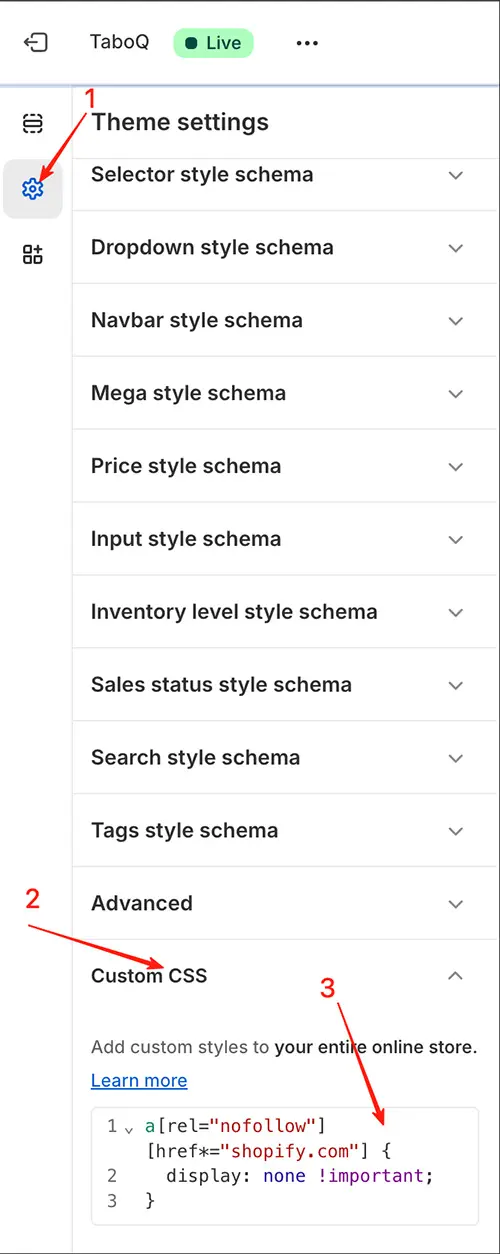
-
Paste the following code into the Custom CSS box:
a[rel="nofollow"][href*="shopify.com"] {
  display: none !important;
}
✅ If there’s already custom CSS, add this snippet at the end.
- Click Save.
✅ Advantages:
- No risk of breaking theme functionality
- Survives theme updates
- Easy to undo (just delete the CSS)
🗑️ Method 2: Remove via Code Edit (Advanced)
This method permanently deletes the link from the theme file. Use only if you’re comfortable editing code.
⚠️ Warning: Editing theme code can break your store if done incorrectly. Always duplicate your theme before making changes.
Steps:
-
Go to Online Store > Themes.
-
Click Actions > Edit code on your published theme.
-
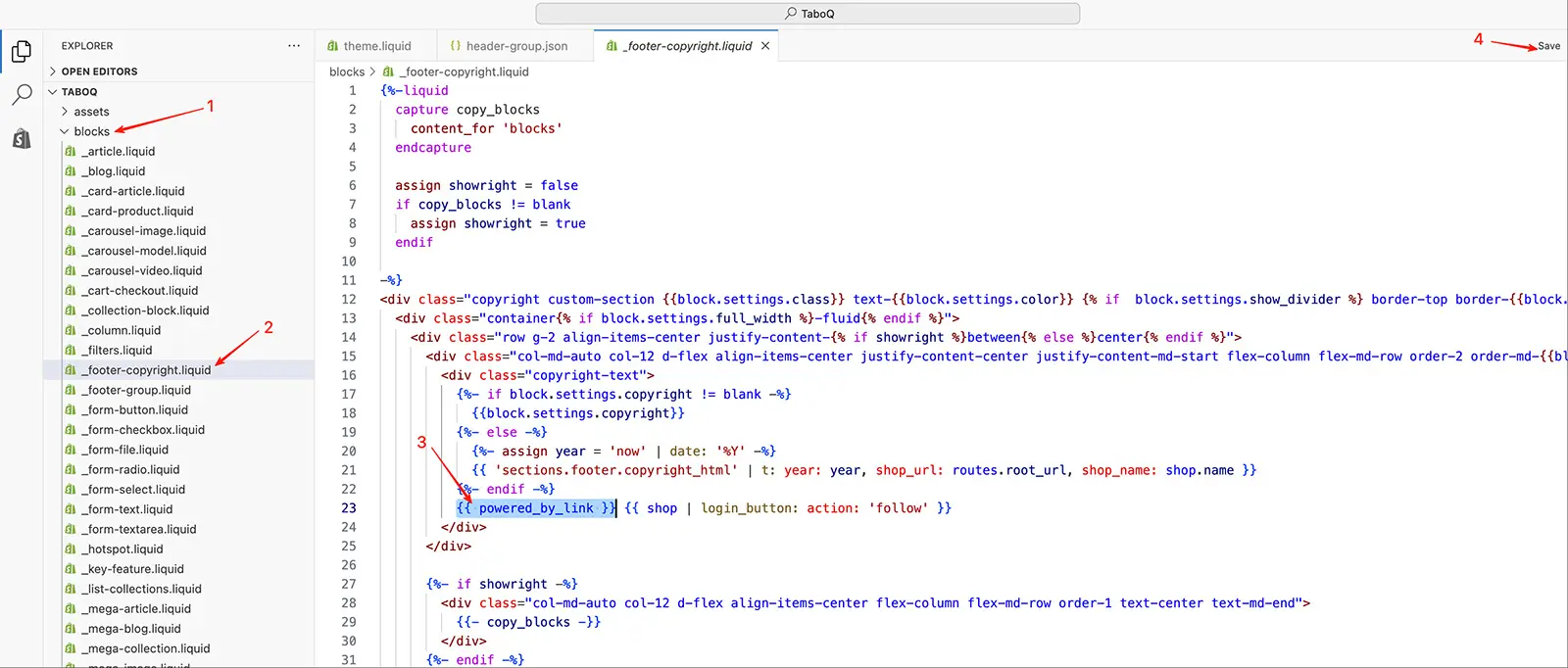
In the left sidebar, expand the blocks folder (the copyright content is typically in a block file).
-
Look for a file that controls the footer copyright, commonly named:
_footer-copyright.liquid(in the blocks folder)
-
Open the file and press Ctrl+F (Windows) or Cmd+F (Mac).
-
Search for:
{{ powered_by_link }} -
Delete the entire line containing this code (or just the
{{ powered_by_link }}part if it appears inline with other text). -
Click Save.
📌 Note: File structure may vary slightly depending on your theme version. If you can’t find the code in Sections, check Snippets.
❓ FAQ
Is it allowed to remove the “Powered by Shopify” link?
✅ Yes. Shopify’s Terms of Service do not require you to display the link. You’re free to remove it.
Will removing it affect my store’s performance or SEO?
❌ No. The link has no impact on speed, functionality, or search rankings.
Which method should I use?
- Use CSS hiding if you want a quick, safe, reversible solution.
- Use code removal only if you need the HTML element completely gone (e.g., for strict compliance or custom footer rebuilds).
💼 Need Help? Hire a Shopify Expert
If you’re unsure about editing code or want professional assistance with theme customization, consider hiring a vetted expert from the Shopify Partner Directory.
Popular Services Include:
- Store build or redesign – Set up a new Shopify store or redesign an existing one
- Theme customization – Personalize layouts, pages, and user flows
- Custom app integrations – Add unique functionality with custom code
- Troubleshooting – Fix errors or performance issues
- Website audit and optimization – Improve speed, UX, and conversion
- Product and collection setup – Organize your catalog with precision
How It Works:
- Browse – Filter partners by service, budget, location, and expertise
- Evaluate – Review portfolios, client ratings, and certifications
- Contact and collaborate – Communicate directly and start your project
Shopify Partners are independent professionals who can help you scale your business—so you can focus on what you do best.
💡 Final Tip: Even if you remove the “Powered by Shopify” link, consider keeping other trust signals—like secure checkout badges, clear return policies, or customer reviews—to maintain confidence and drive conversions.