Updating Your Theme
We regularly update our themes to include bug fixes, new sections, and compatibility with the latest Shopify features.
Theme updates are free for life on Shopify. If you have a valid license (i.e., you purchased the theme from the Shopify Theme Store), you can update to the latest version at no additional cost.
If you manually imported a ZIP file or downloaded the theme from an unauthorized source (e.g., Fiverr, Facebook, or third-party marketplaces), you will not receive updates and may be using an unlicensed copy. To continue using the theme legally and securely, please purchase it from the official Shopify Theme Store.
You can learn more about theme updates in Shopify’s official documentation.
Automatic Updates
If your theme qualifies for automatic updates, Shopify will:
- Automatically apply the latest version to your published theme
- Display a notification in your Themes list
✅ You qualify for automatic updates only if:
- You have never edited the theme code using the code editor
- You have not hired a developer to modify your theme files
- You have not installed any apps that edit your theme code on your behalf
If any of these conditions are not met, automatic updates will be disabled.
Manual Updates
If your theme has been customized, Shopify will not auto-update it. Instead, you’ll see a message like:
“A new version of this theme is available.”
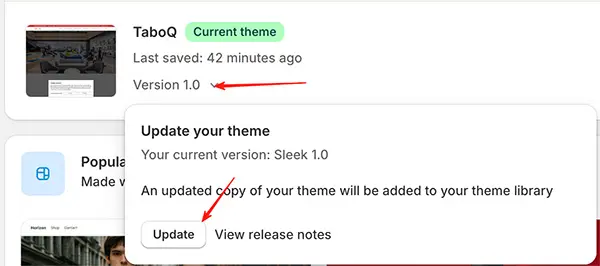
How to manually update:
- Click “Update”.
Shopify will create a new unpublished theme with the latest version. - The new theme will include all updated templates and features, but your custom code (CSS, JavaScript, or Liquid modifications) will not be carried over.
- You must manually reapply any customizations to the new theme version.
❗ Note: Our support team does not assist with migrating custom code between theme versions. If you need help, consider hiring a Shopify Expert.
To download the latest version:
- Go to the Shopify Theme Store
- Re-download the theme ZIP file (free for licensed users)
- Upload it as a new theme or use the “Add to theme library” option
By keeping your theme up to date, you ensure better performance, security, and compatibility with Shopify’s evolving platform.